Adding my EV Charger to the Sunsynk card
Previously, I wrote about the excellent Sunsynk Home Assistant dashboard card and how useful it is for visualising solar, battery, and grid usage at a glance. Since then, we’ve had our Octopus Charge EV charger installed, which meant it was time to integrate the charger into the Sunsynk card as well.
That turned out to be slightly more involved than I expected.
The EV charger is wired outside of the solar and battery feed. This is intentional, as it prevents the solar batteries from discharging when the car is charging — something I very much want to avoid. The downside is that it complicates how the energy flows are visualised in Home Assistant.
To keep everything accurate, we now have four CT clamps monitoring different loads around the house:
House feed for the solar inverter
Heat pump load for heating and hot water (Shelly Pro EM-50)
Heat pump immersion load (Shelly Pro EM-50)
EV charger load (Shelly Pro EM-50)
Getting all of these working together in the Sunsynk card took some trial and error, especially with the EV charger sitting outside the main solar path.
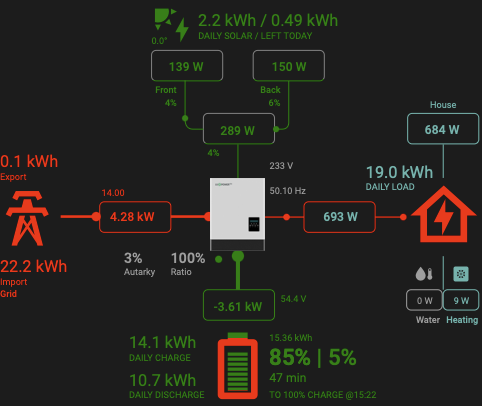
Before making these changes, the dashboard looked like this, using the compact view of the Sunsynk card:
Previous Sunsynk Card
It now looks like this
New Sunsynk card with EV charger added
I had some issues getting the YAML correct. Below is the YAML for the new card view
```
type: custom:sunsynk-power-flow-card
cardstyle: full
wide: false
large_font: false
show_solar: true
show_battery: true
show_grid: true
center_no_grid: false
card_height: 100%
card_width: 100%
decimal_places: 2
decimal_places_energy: 1
dynamic_line_width: true
max_line_width: 4
min_line_width: 1
inverter:
  model: lux
  modern: false
  auto_scale: true
battery:
  energy: 19200
  shutdown_soc: 5
  show_daily: true
  invert_power: true
  colour: "#ffa500"
  auto_scale: true
  max_power: 3600
  show_remaining_energy: true
  charge_colour: "#008000"
  remaining_energy_to_shutdown: true
solar:
  colour: "#008000"
  show_daily: true
  mppts: 2
  display_mode: 2
  pv1_name: Front
  pv1_max_power: 3360
  pv2_name: Back
  pv2_max_power: 2520
  auto_scale: true
  dynamic_colour: true
  efficiency: 3
load:
  essential_name: House
  auto_scale: true
  show_aux: false
  show_daily: true
  dynamic_colour: true
  dynamic_icon: true
  additional_loads: 2
  load1_name: Heating
  load1_icon: mdi:heat-pump
  load2_name: Water
  load2_icon: mdi:water-thermometer
grid:
  colour: "#ff0000"
  dynamic_colour: true
  show_daily_buy: true
  show_daily_sell: true
  show_nonessential: true
  nonessential_name: EV
  nonessential_icon: mdi:ev-plug-type2
  invert_grid: true
  no_grid_colour: "#9e9e9e"
  auto_scale: true
  export_colour: "#008000"
  grid_off_colour: "#9e9e9e"
  label_daily_grid_sell: Export
  label_daily_grid_buy: Import
entities:
  day_pv_energy_108: sensor.lux_solar_output_daily
  inverter_voltage_154: sensor.lux_grid_voltage_live
  load_frequency_192: sensor.lux_grid_frequency_live
  inverter_current_164: none
  inverter_power_175: sensor.lux_battery_flow_live
  inverter_status_59: sensor.lux_status
  day_battery_charge_70: sensor.lux_battery_charge_daily
  day_battery_discharge_71: sensor.lux_battery_discharge_daily
  battery_voltage_183: sensor.lux_battery_voltage_live
  battery_soc_184: sensor.lux_battery
  battery_power_190: sensor.lux_battery_flow_live
  battery_current_191: none
  grid_power_169: sensor.grid_power
  day_grid_import_76: sensor.lux_power_from_grid_daily
  day_grid_export_77: sensor.lux_power_to_grid_daily
  grid_ct_power_172: sensor.lux_grid_flow_live
  day_load_energy_84: sensor.lux_home_consumption_daily
  essential_power: sensor.lux_home_consumption_live
  aux_power_166: null
  pv_total: sensor.lux_solar_output_live
  pv1_power_186: sensor.lux_solar_output_array_2_live
  pv2_power_187: sensor.lux_solar_output_array_1_live
  pv1_voltage_109: none
  pv1_current_110: none
  pv2_voltage_111: none
  pv2_current_112: none
  inverter_ac_temp: sensor.lux_radiator_1_temperature_live
  inverter_dc_temp: sensor.lux_radiator_2_temperature_live
  remaining_solar: sensor.solcast_pv_forecast_forecast_remaining_today
  energy_cost_sell: sensor.agile_current_export_rate
  energy_cost_buy: sensor.agile_current_import_rate
  essential_load1: sensor.heat_pump_power
  essential_load2: sensor.immersion_power
  nonessential_power: sensor.shelly_pro_em_50_ev_charger_energy_meter_0_power
   environment_temp: sensor.espaltherma_outdoor_air_temperature
  ```
The key changes to the Sunsynk card configuration are shown below.
cardstyle: full
This replaces the compact view that I was previously using and allows additional loads to be displayed more clearly.
Heat pump loads
The heat pump is split into two separate loads within the card:
additional_loads: 2
load1_name: Heating
load1_icon: mdi:heat-pump
load2_name: Water
load2_icon: mdi:water-thermometer
This makes it much easier to see, at a glance, whether the heat pump is running for space heating or hot water.
The following entities are used to populate the loads:
essential_load1: sensor.heat_pump_power
essential_load2: sensor.immersion_power
nonessential_power: sensor.shelly_pro_em_50_ev_charger_energy_meter_0_power
As I’m writing this in February, I can’t currently show what this looks like with solar production. The examples below still give a good idea of how the layout works in practice.
Exporting to the grid

Battery being used. We are off grid